Standalone Nexus Operation
What is a Standalone Nexus Operation?
A Standalone Nexus Operation is a top-level Nexus Operation Execution started directly by a Client, without using a caller Workflow. Instead of calling a Nexus Operation from within a Workflow Definition, you execute it directly from a Nexus Client created from the Temporal SDK Client and bound to a Nexus Endpoint and Service.
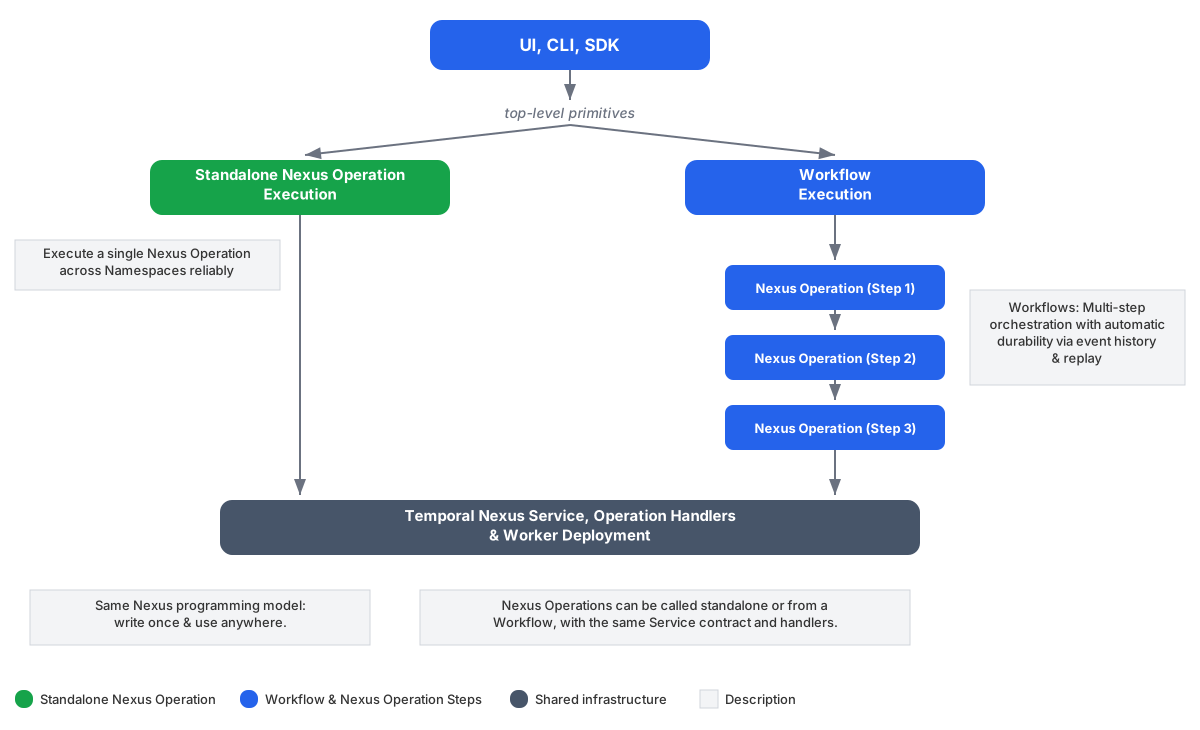
Standalone Nexus Operations use the same Service contract, Operation handlers, and Worker setup as Workflow-driven Operations — only the caller side differs. The same Operation can be executed as a Standalone Nexus Operation and as a Workflow-driven Nexus Operation with no handler code changes.
If you need to orchestrate multiple Nexus Operations, call them from a Workflow. But if you just need to execute a single Nexus Operation across Namespace boundaries, use a Standalone Nexus Operation.
Get started with your SDK
To make your first standalone Nexus call:
- Create a caller Namespace where durable Nexus Operations will be started.
- Import the Temporal SDK in your language of choice.
- Execute a Nexus Operation through your caller Namepace using the Temporal SDK Client.
See the SDK guides below for details:
Use cases
Make Nexus calls from anywhere
Standalone Nexus Operations let you make Nexus calls from anywhere using the Temporal SDK Client. Any code that can construct a Temporal Client can durably hand off a Nexus Operation to Temporal, such as a UI backend or BFF, a non-Temporal microservice, an HTTP handler, or a script. You still get automatic retries, built-in rate limiting and circuit breaking, and full execution visibility: the reliability of Nexus without the overhead of a caller (proxy) Workflow.
Key features
- Execute any Nexus Operation as a top-level primitive without the overhead of a caller Workflow
- Same Service contract, Operation handlers, and Worker setup as Workflow-driven Operations
- Supports both synchronous and asynchronous (Workflow-backed) Nexus Operations
- At-least-once execution with automatic retries by the Nexus Machinery
- Get a handle to retrieve results, with the Operation token for asynchronous Operations
- List and count Standalone Nexus Operation Executions using List Filter queries
- Execute the same Operation from a Workflow or standalone with no handler code changes
Migrate a single-Operation caller Workflow to a Standalone Nexus Operation
A common pattern is a caller Workflow whose only purpose is to invoke a single Nexus Operation. When that's all the Workflow does, you can drop the caller Workflow entirely and call the Operation as a Standalone Nexus Operation. The handler Namespace's Service contract, Operation handlers, and Workers do not change — only the caller side does.
Considerations when migrating:
- If the caller Workflow does more than one Operation call, or has business logic between calls, keep the Workflow. Standalone Nexus Operations are only a fit when a single top-level Operation is all the Workflow did.
- Pick a stable Operation ID if you previously relied on Workflow ID reuse semantics for deduplication.
- Update Visibility queries that filtered by caller Workflow attributes.
For SDK-specific syntax, see the per-SDK guide — for example Go: Standalone Nexus Operations.
Observability
You can use List Filters to query Standalone Nexus Operation Executions by Endpoint, Service, Operation, status, and other attributes using the SDK.
CountNexusOperations returns the total number of Standalone Nexus Operation Executions matching a
filter. This is the total count of executions (running, completed, failed, etc.) — not the number of
queued tasks.
Pre-release limitations
Standalone Nexus Operations are at Pre-release. APIs are experimental and may be subject to backwards-incompatible changes.
Temporal CLI support
Standalone Nexus Operations require a Pre-release build of the Temporal CLI that includes
the temporal nexus operation command family. All commands are Experimental.
Download for your platform:
curl -L https://github.com/temporalio/cli/releases/download/v1.7.4-standalone-nexus-operations/temporal_cli_1.7.4-standalone-nexus-operations_darwin_arm64.tar.gz | tar xz
curl -L https://github.com/temporalio/cli/releases/download/v1.7.4-standalone-nexus-operations/temporal_cli_1.7.4-standalone-nexus-operations_darwin_amd64.tar.gz | tar xz
curl -L https://github.com/temporalio/cli/releases/download/v1.7.4-standalone-nexus-operations/temporal_cli_1.7.4-standalone-nexus-operations_linux_arm64.tar.gz | tar xz
curl -L https://github.com/temporalio/cli/releases/download/v1.7.4-standalone-nexus-operations/temporal_cli_1.7.4-standalone-nexus-operations_linux_amd64.tar.gz | tar xz
Verify the installation:
./temporal --version
# temporal version 1.7.4-standalone-nexus-operations
Move the binary to your PATH or run it from the current directory as ./temporal.
- The standard
brew install temporalorbrew upgrade temporaldoes not include Standalone Nexus Operation support during Pre-release. - If you see
unknown command "nexus operation"then you are using the standard Temporal CLI instead of the Pre-release version above. - If you see
Standalone Nexus Operations are disabledwhen running commands against a local dev server, then your server does not support the feature. Start it with the Pre-release dev server build above, which enables Standalone Nexus Operations by default. - If you don't see the Standalone Nexus Operations button in the Temporal UI, make sure the UI is running the latest release and has the
EnableStandaloneNexusOperationsfeature flag enabled.
The temporal nexus operation subcommand supports Standalone Nexus Operations with commands
including: start, execute, result, list, count, describe, cancel, and terminate.
The Nexus Endpoint must already exist on the server — create it with
temporal operator nexus endpoint create.
Temporal Cloud support
Standalone Nexus Operations in Temporal Cloud is available as a Pre-release feature.